
Publishing more content does not always mean getting more organic traffic. As a website grows, it can accumulate outdated articles, overlapping pages, thin content, and URLs that no longer serve a clear purpose.
That is where SEO content pruning becomes useful.
SEO content pruning is the process of reviewing existing website content and deciding whether each page should be kept, improved, consolidated, redirected, or removed. The goal is not to delete pages simply because they have low traffic. The goal is to improve the quality, relevance, and usefulness of the content you already have.
When I review existing content, I do not start by looking for pages to delete. I start by identifying pages that have lost visibility, overlap with other URLs, contain outdated information, or no longer satisfy their original search intent.
Every important page should have a clear purpose, whether that is attracting organic traffic, answering a specific search query, supporting another page, generating leads, or strengthening topical relevance.
In this guide, I’ll explain how SEO content pruning works, how to identify pages that need attention, how to decide between keeping, improving, consolidating, and removing a page, and how to prune your website without creating unnecessary SEO problems.
What Is SEO Content Pruning?
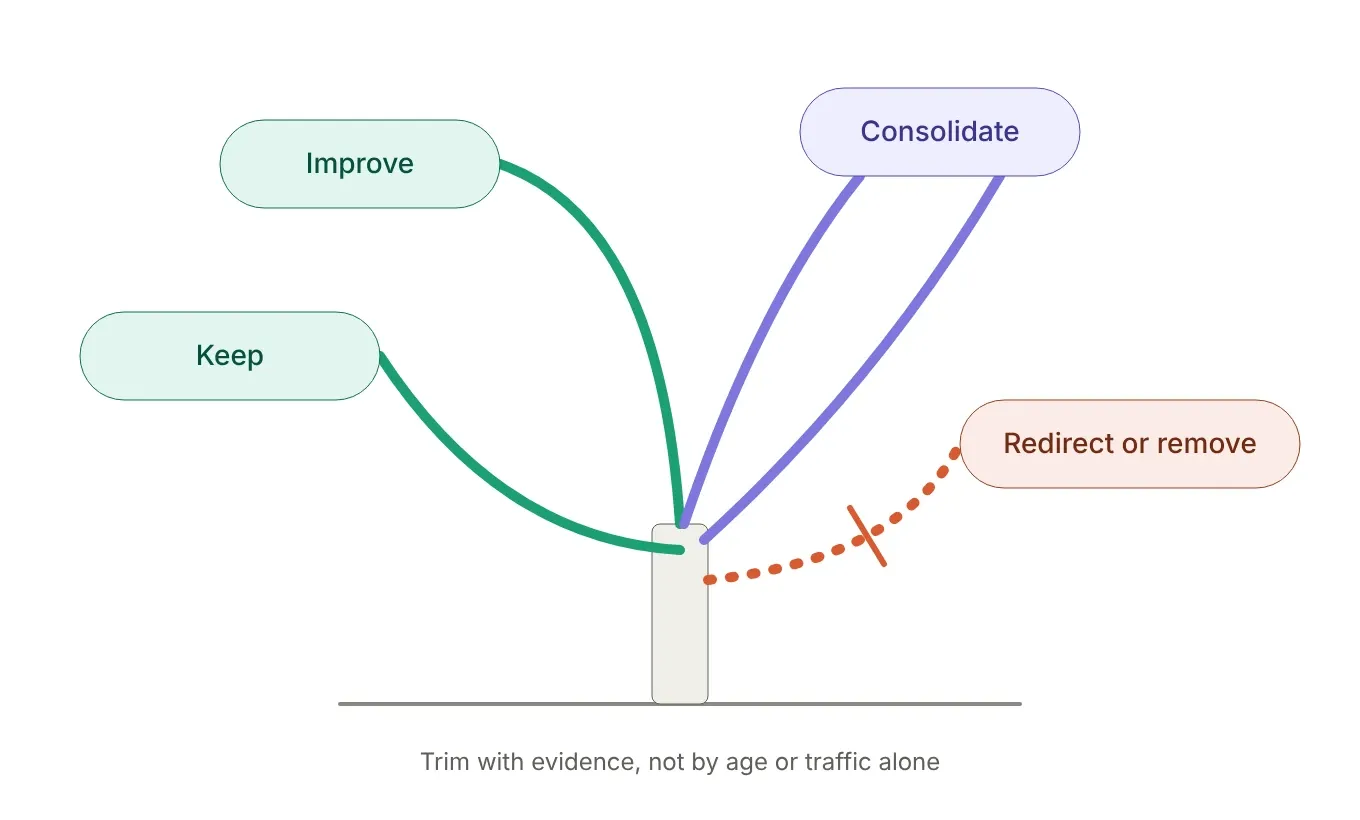
SEO content pruning is the process of evaluating existing website pages and deciding what should happen to each one.
Depending on the evidence, a page may be kept as it is, updated, consolidated with another page, redirected, or removed.
The important distinction is that content pruning is not the same as deleting old content.
A page with low traffic may still have valuable backlinks, keyword rankings, conversions, or an important role within your internal linking structure. Removing it without reviewing those factors can create more problems than it solves.
Content pruning is also different from a standard content audit.
A content audit helps you understand what exists on your website and how each page performs. Content pruning takes the next step by turning that information into decisions.
For example, imagine a website has three articles targeting closely related SEO topics. All three receive limited traffic and contain overlapping information.
Publishing a fourth article probably does not solve the underlying problem.
A better approach could be to combine the strongest information from the three existing articles into one comprehensive resource, redirect the weaker URLs when appropriate, and update internal links to point toward the new primary page.
This is closely connected to a strong content strategy, because your pages should work together rather than compete unnecessarily for similar search intent.
What Types of Content Should You Prune?
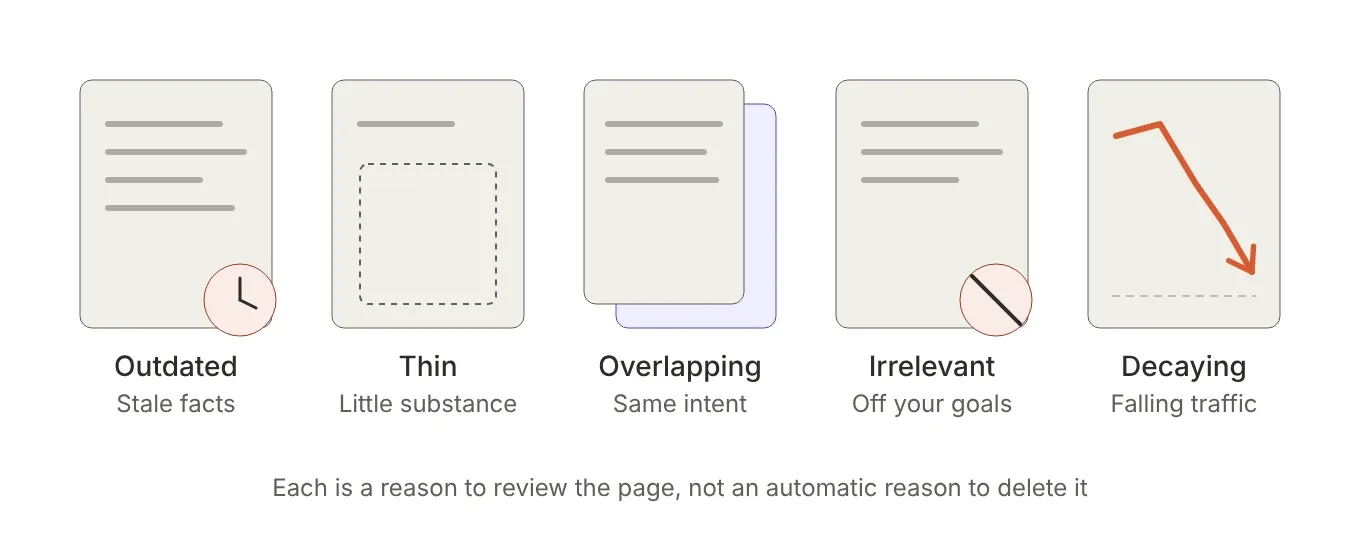
There is no single traffic threshold that tells you a page should be deleted. Instead, look for several warning signs.
Outdated content is one of the clearest candidates for review. Statistics, software instructions, SEO recommendations, pricing information, and other time-sensitive details can become inaccurate.
Thin content may also need attention when a page provides little useful information compared with competing results or other pages on your website. However, thin does not automatically mean delete. Expanding and improving the page may be the better option.
Duplicate or overlapping content deserves particular attention. If several URLs target nearly the same search intent, determine whether they genuinely serve different purposes.
Irrelevant content can accumulate as a website grows. An article that once matched your business or audience may no longer support your current goals.
Finally, some pages experience content decay. They may have performed well in the past but gradually lose rankings, impressions, clicks, or conversions.
A decline does not automatically mean the page should be removed. It is a signal that the page deserves investigation.
The key principle is simple: prune based on evidence, not age or traffic alone.
Why Is SEO Content Pruning Important for SEO?
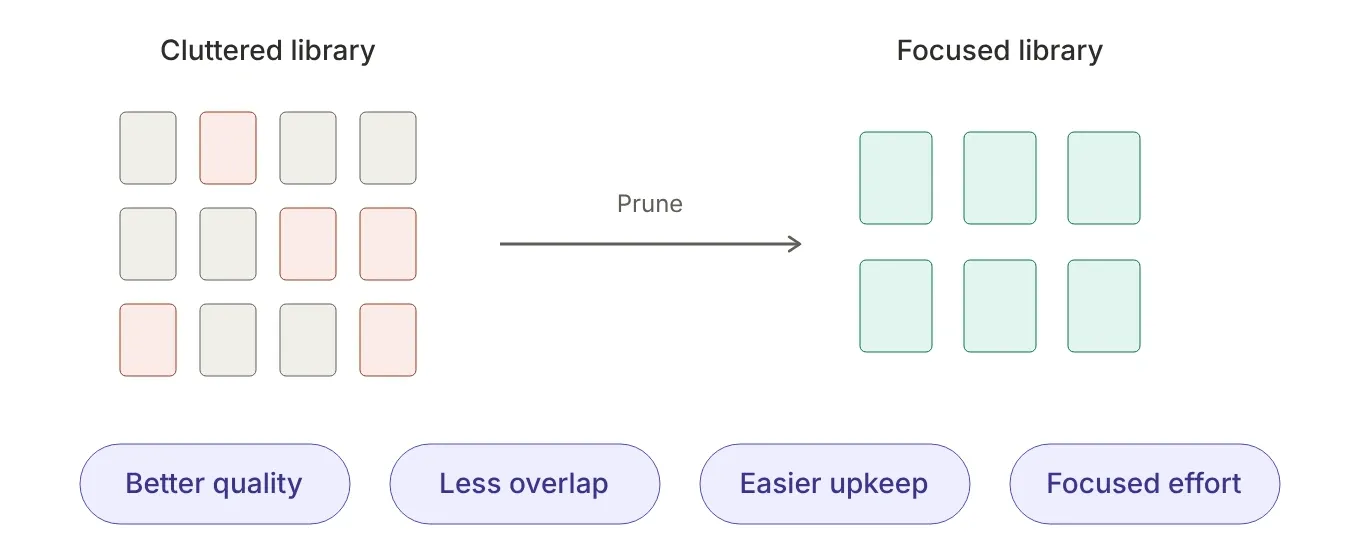
A growing website can accumulate pages that no longer contribute much value. Some become outdated, others overlap with newer content, and some attract visitors without supporting any meaningful business goal.
SEO content pruning helps you identify these pages and make deliberate decisions about them.
The main benefit is not simply having fewer URLs. The real benefit is having a stronger, more focused content library.
Improve the Quality of Your Content
Search engines aim to provide useful results that satisfy search intent. If your website contains outdated, incomplete, or repetitive pages, those pages may provide a poor experience for visitors.
Pruning allows you to identify content that needs improvement.
Instead of continuously publishing new articles, you can sometimes get more value from updating pages you already have.
This is particularly useful for websites that have been publishing content for several years. Older articles can contain outdated statistics, broken links, obsolete recommendations, or information that no longer reflects how a topic works.
Reduce Content Overlap and Keyword Cannibalization
Multiple pages targeting similar topics can create unnecessary competition within your own website.
For example, imagine you have three articles targeting variations of the same search intent:
SEO content audit, SEO website audit, and SEO content analysis.
These topics can have legitimate differences, but if the three pages ultimately answer the same question for the same audience, keeping them separate may not be the best strategy.
A pruning review can reveal these overlaps. You may decide to rewrite one page, combine several pages, or clearly differentiate their search intent.
Your SEO blog should have logical relationships between related resources rather than several pages competing to answer essentially the same question.
Make Your Website Easier to Maintain
Every published URL creates a maintenance responsibility.
Someone eventually needs to check whether the information is accurate, whether the links still work, whether the page still matches search intent, and whether it still supports your broader content strategy.
A smaller collection of useful, well-maintained pages can be easier to manage than a much larger collection containing outdated or redundant URLs.
Pruning helps you spend your time on pages that deserve attention.
Focus Your SEO Efforts on Valuable Content
Your strongest pages deserve the most attention.
When you identify weak or redundant content, you can redirect your effort toward improving pages with meaningful search visibility, backlinks, conversions, or strategic importance.
This does not mean deleting pages automatically improves rankings. There is no universal SEO rule that says fewer pages equal better rankings.
The decision needs to be based on the individual page and its role within the website.
Good SEO content pruning is therefore a quality-control process, not a race to delete URLs.
How to Identify Content That Needs Pruning
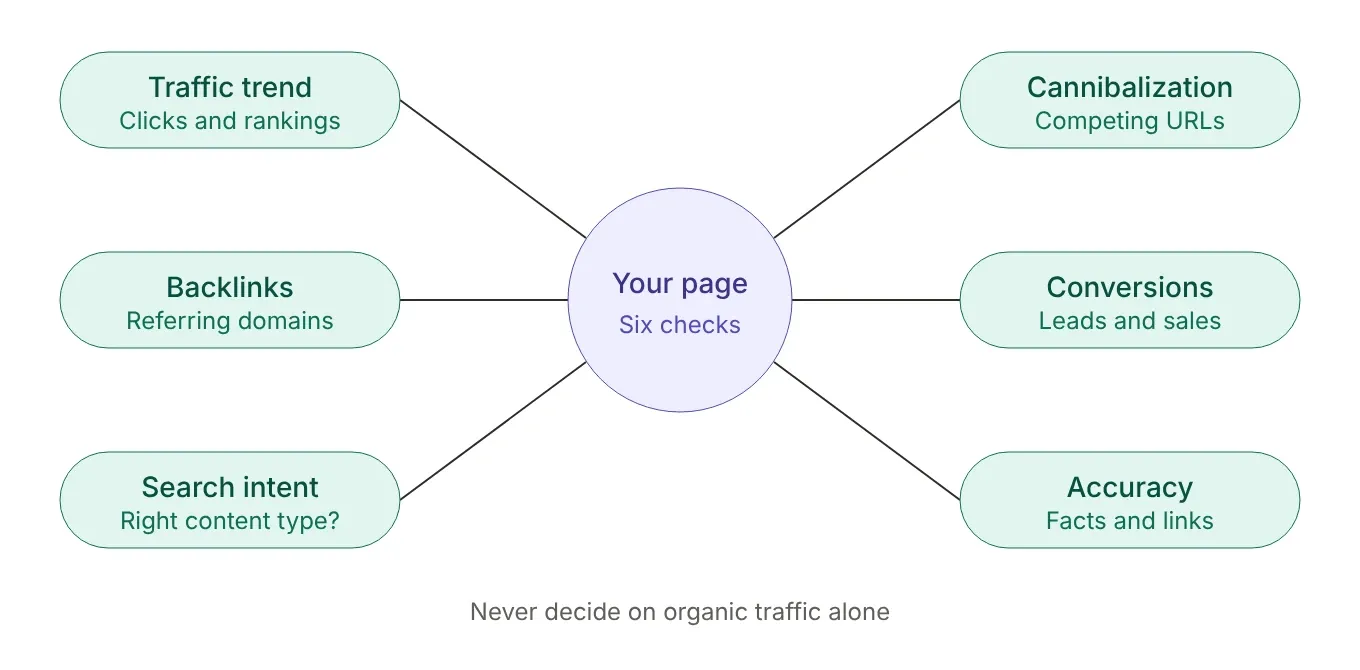
Before removing or redirecting a page, evaluate it from several angles.
Organic traffic is useful, but it should never be the only metric behind a pruning decision.
The goal is to understand whether the page still has search value, business value, links, or a useful role within your website.
Check Organic Traffic and Search Visibility
Start by reviewing organic clicks, impressions, rankings, and traffic trends.
Look beyond the current number.
A page receiving 20 organic visits per month may appear insignificant, but if it was receiving 200 visits six months ago, the decline deserves investigation.
Also check whether the page ranks for several relevant long-tail queries. A page with modest traffic can still rank for valuable keywords that would be difficult to recover after deletion.
The direction of performance matters as much as the current performance.
Review Backlinks and Referring Domains
Before removing a URL, check whether other websites link to it.
A page with few visitors can still have valuable external links. If you remove a page that has valuable backlinks, first check whether a relevant replacement page exists. When an appropriate replacement exists, a permanent redirect can help users and search engines reach the new resource.
Look at the number and quality of referring domains, not just the raw backlink count.
A page with several relevant links from authoritative websites deserves more careful consideration than a page with hundreds of low-quality links.
This is also where a broader link-building strategy becomes relevant. Content can continue providing value through external links even when its current organic traffic is relatively small.
Check Rankings and Search Intent
Ask whether the page still satisfies the search intent behind its primary keywords.
Search intent can change. Your page may have been a good result when it was published but become less useful as search results evolve.
Compare the page with current search results. Look at what users appear to expect from the query.
Are they looking for a guide, comparison, definition, product, case study, or something else?
If your page targets the right keyword but provides the wrong type of content, updating it may be more appropriate than deleting it.
Identify Keyword Cannibalization
Look for multiple pages ranking for the same or closely related queries.
Keyword cannibalization does not mean that two pages can never rank for related keywords. The problem occurs when several pages have substantially overlapping intent and compete for the same opportunity without serving distinct purposes.
If two pages cover nearly identical topics, consider whether they would perform better as one stronger resource.
Review Conversions and Business Value
Organic traffic is not the only measure of value.
A page with 50 monthly visitors that generates qualified leads may be more valuable than a page with 1,000 visitors that produces no meaningful business outcome.
Check form submissions, sales, email signups, assisted conversions, and other relevant actions before deciding that a page is expendable.
If the page supports a commercial service or important conversion path, treat it differently from an informational article with no clear business role.
Check Content Accuracy and Relevance
Finally, review the actual content.
Ask whether the information is accurate, current, useful, and aligned with your target audience.
Check for outdated examples, broken links, obsolete recommendations, missing information, and sections that no longer match the search intent.
A page can have declining traffic because the content needs improvement, not because the topic itself has become useless.
At this stage, you should have enough evidence to classify the page rather than making a simple keep-or-delete decision.
SEO Content Pruning Decision Framework
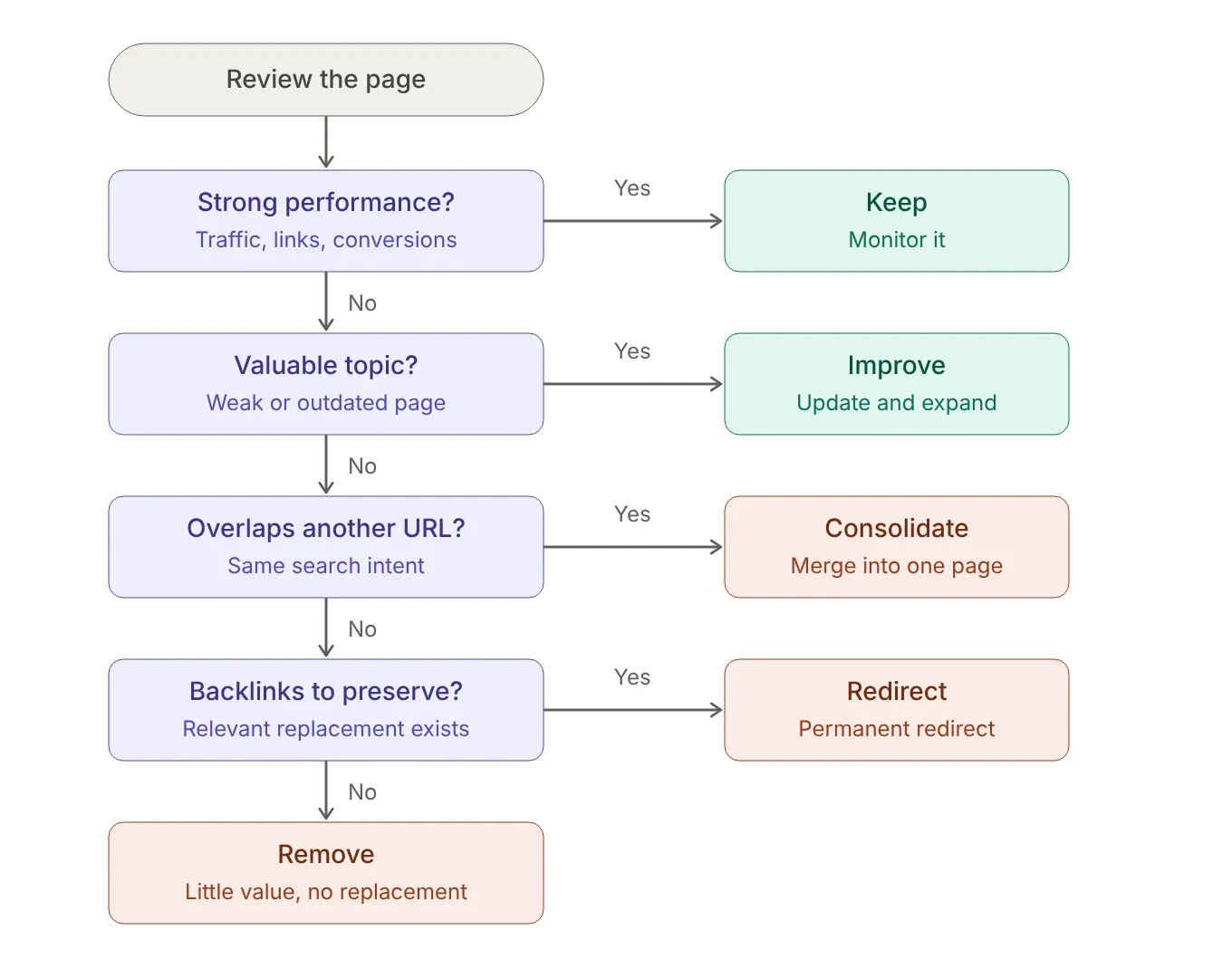
Once you have reviewed a page's traffic, rankings, backlinks, search intent, and business value, the next step is to make a clear decision.
I recommend using four primary actions: keep, improve, consolidate, or remove.
Situation | Recommended action |
|---|---|
Strong traffic, rankings, links, or conversions | Keep |
Valuable topic but outdated or underperforming content | Improve |
Multiple URLs target substantially the same intent | Consolidate |
Page has valuable backlinks and a relevant replacement exists | Redirect |
Page has little value and no suitable replacement | Remove |
Important page with declining performance | Investigate and improve |
This framework prevents a common mistake: treating low traffic as an automatic reason for deletion.
Keep the Page
Keep a page when it continues to satisfy search intent and provides meaningful value.
A page does not need thousands of monthly visitors to justify keeping it.
It may have strong rankings, valuable backlinks, consistent conversions, or an important role in your site's internal linking structure.
If the information is accurate and the page has a clear purpose, there may be no reason to change it simply because another page receives more traffic.
Improve the Page
Choose improvement when the topic is valuable, but the existing page is underperforming.
For example, a page may target an important keyword but provide an outdated or incomplete answer.
In that situation, rewrite the introduction, expand missing sections, update statistics, improve examples, and better match search intent.
You should also review the page's title, headings, internal links, images, and supporting information.
Do not add words simply to increase word count. Every change should make the page more useful.
Consolidate Similar Pages
Consolidation makes sense when multiple pages cover substantially overlapping topics.
Suppose your website has three articles discussing similar aspects of SEO audits. Instead of maintaining three weak resources, you could combine the strongest material into one comprehensive page.
After creating the stronger resource, the older URLs can potentially be redirected to the consolidated page when the relationship between the URLs is appropriate.
This can also simplify your internal linking structure.
Instead of linking to several overlapping articles, you can direct visitors and search engines toward one primary resource.
Remove or Redirect the Page
Removal is appropriate when a page has little or no remaining value, and there is no strong reason to preserve the URL.
Before removing it, check for backlinks, rankings, traffic, conversions, internal links, and other meaningful signals.
If another relevant page exists, a redirect may be appropriate.
If the content has no suitable replacement and the URL genuinely has no ongoing purpose, removal may be the better choice.
Avoid redirecting every deleted page to your homepage or an unrelated article. A redirect should lead users to a destination that genuinely matches the original page's intent.
SEO Content Pruning Example
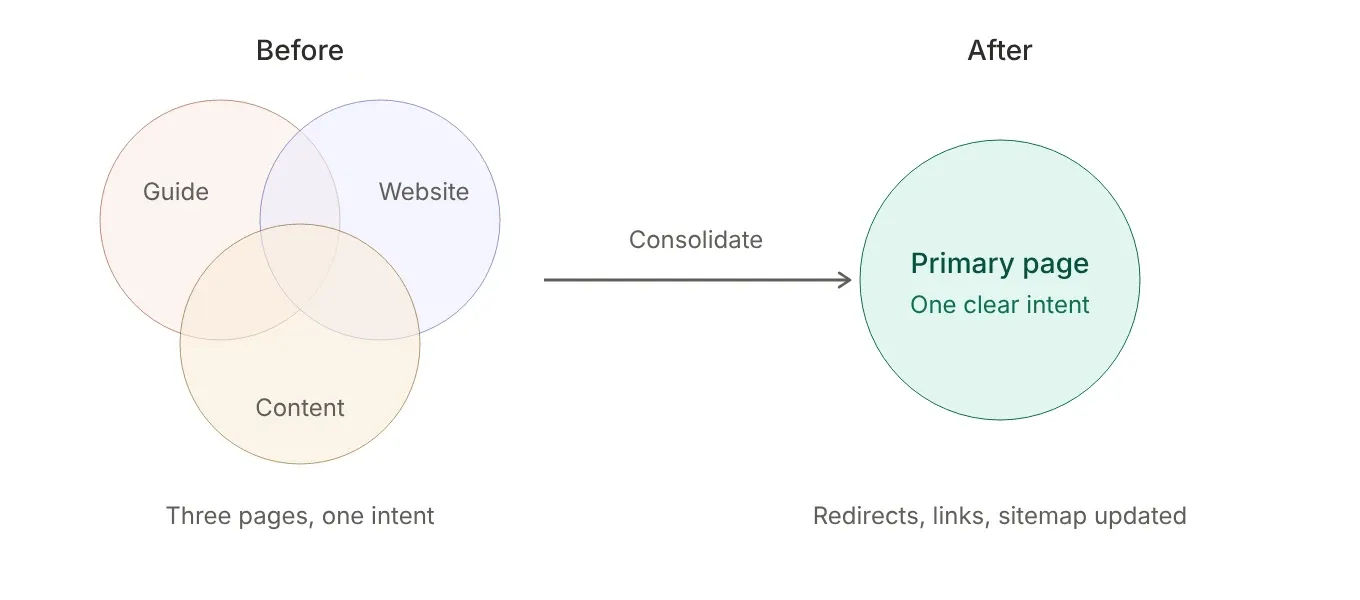
Consider a website with three articles about SEO audits.
The first article is an older general guide. The second focuses on SEO website audits. The third covers SEO content audits. All three pages have similar sections, target closely related keywords, and receive limited organic traffic.
Publishing another article would add more overlap.
Instead, I would compare the three URLs and identify which page has the strongest combination of rankings, backlinks, internal links, content quality, and business value.
I would then use that URL as the primary resource.
The strongest information from the other two articles could be incorporated into the primary page. Unnecessary duplication would be removed, the search intent would be clarified, and internal links across the website would be updated to point toward the consolidated resource.
If the older URLs have valuable backlinks and the new primary page is a genuinely relevant replacement, permanent redirects may be appropriate.
This example shows why content pruning is more than deleting pages. The real objective is to turn several overlapping resources into a clearer content structure.
How to Prune Website Content Without Hurting SEO
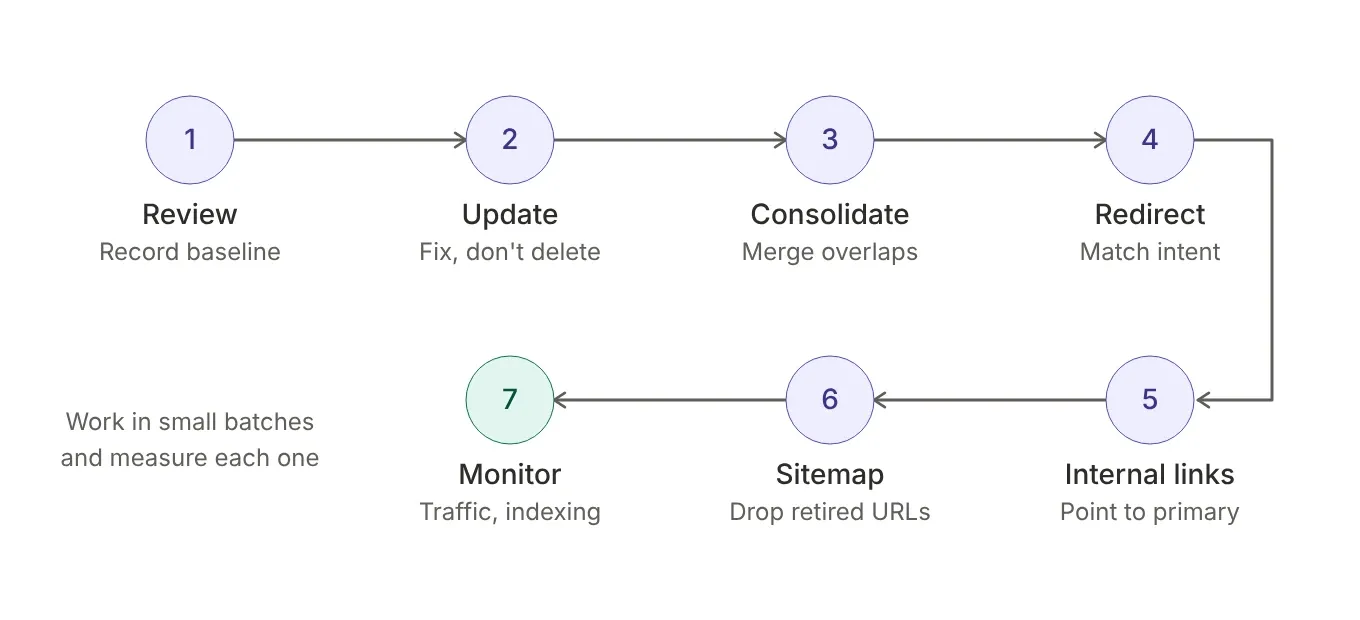
SEO content pruning should be handled carefully.
Removing a URL is not automatically an SEO improvement, and deleting pages in bulk can create broken links, lost rankings, or unnecessary traffic declines.
The safest approach is to evaluate each URL first, choose the appropriate action, and monitor the results after making the change.
Review the URL Before Making Changes
Start by recording the page's current performance.
Check organic traffic, impressions, rankings, backlinks, conversions, internal links, and indexing status.
Also review whether other pages on your website target the same search intent.
This gives you a baseline before making changes.
If you are already conducting a broader free SEO audit, content pruning can become part of that process rather than a completely separate task.
Update Valuable Content Instead of Removing It
If a page targets a useful topic but contains outdated or incomplete information, update it first.
Review the title, introduction, headings, examples, statistics, links, and overall search intent.
Remove obsolete information and replace it with accurate, useful material.
The objective is not to make the page longer. The objective is to make it more helpful.
Consolidate Overlapping Pages
When several pages cover nearly the same topic, determine whether one page can become the primary resource.
Move the strongest information into the page you want to keep. Remove unnecessary duplication and make the remaining resource comprehensive enough to satisfy the relevant search intent.
Once the new primary page is ready, redirect the old URLs when appropriate.
Use Redirects Carefully
If an old page has been permanently replaced by another relevant page, a redirect can help send users and search engines to the new destination.
The replacement should be genuinely relevant.
Before implementing redirects, create a list of the URLs being changed and their intended destinations. This makes the process easier to review and reduces implementation errors.
Update Internal Links
After removing or consolidating content, review your internal links.
Other pages may still link to URLs that no longer exist. Those links should be updated to point toward the new primary resource or another relevant page.
This is particularly important when consolidating several articles into one.
Your SEO strategy should guide these relationships so that important pages receive appropriate internal support.
Review Your Sitemap
If a page has been permanently removed, make sure it is no longer unnecessarily included in your XML sitemap.
Your sitemap should represent the URLs you want search engines to discover and consider as part of your active website structure.
After major pruning work, check the sitemap and make sure removed or redirected URLs have not been left behind unintentionally.
Monitor the Site After Pruning
Do not assume the work is finished immediately after deleting or redirecting pages.
Monitor organic traffic, rankings, indexing, crawl errors, redirects, and conversions after the changes.
If a consolidated page loses visibility or an important query disappears, investigate what changed.
You may discover that the removed page had more value than initially expected.
Good content pruning is therefore an iterative process. Review the evidence, make controlled changes, and measure the outcome before moving on to another group of URLs.
SEO Content Pruning Checklist
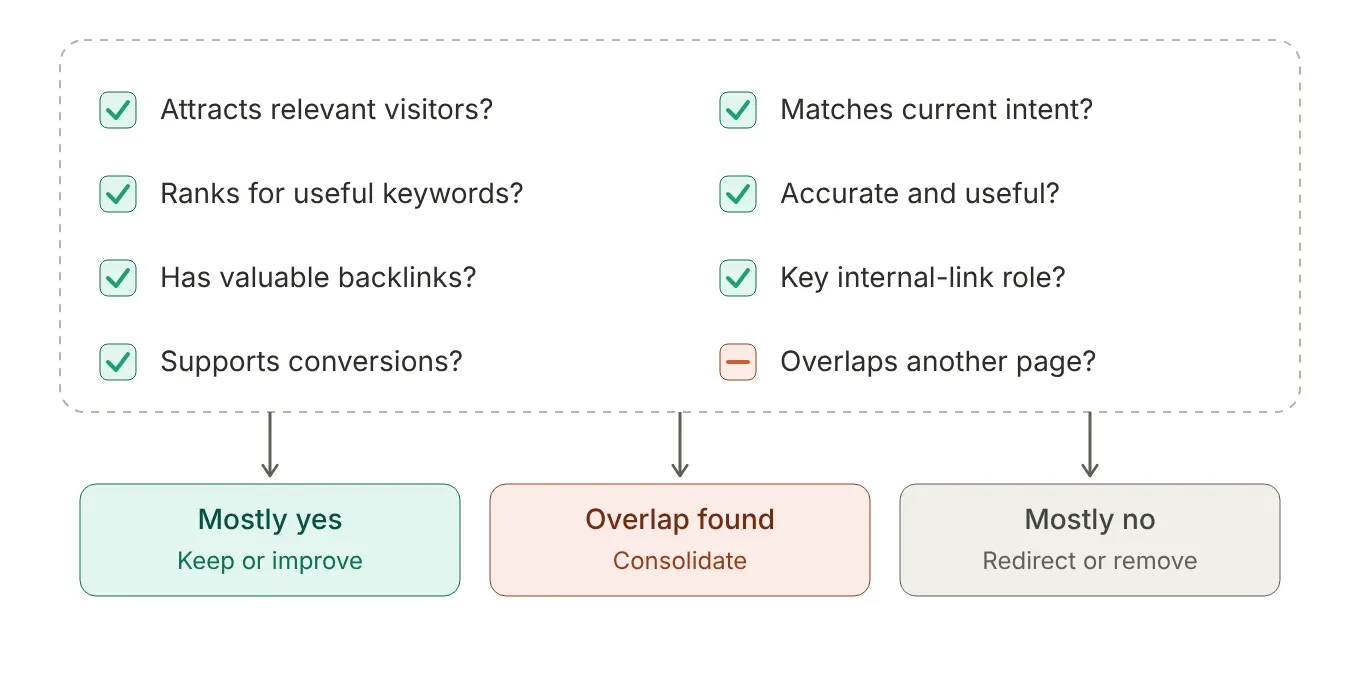
Before removing, redirecting, or consolidating a page, run through the same evaluation process each time.
Start by asking whether the page still receives organic traffic, impressions, or meaningful keyword rankings.
Next, check whether the URL has valuable backlinks or referring domains.
Review the page's business value as well. Look for leads, conversions, assisted conversions, or other actions that show the page contributes beyond organic traffic.
Then examine search intent and content quality.
Is the information accurate? Is the topic still relevant? Does the page answer the question better than it did when originally published?
You should also look for overlapping pages.
If another URL covers substantially the same topic, decide whether both pages have distinct purposes. If they do not, consolidation may be a better solution.
Finally, check your internal links and redirects before making the change.
Ask these questions before making a final decision:
Does the page still attract relevant visitors?
Does it rank for useful keywords?
Does it have valuable backlinks?
Does it generate or support conversions?
Does it satisfy current search intent?
Is the information accurate and useful?
Does another page substantially overlap with it?
Does the URL have an important role in the internal linking structure?
If most answers point toward continued value, keep or improve the page. If another URL serves the same purpose better, consider consolidation. If the page has little value and no suitable purpose, removal or redirection may be appropriate.
How Often Should You Prune Website Content?
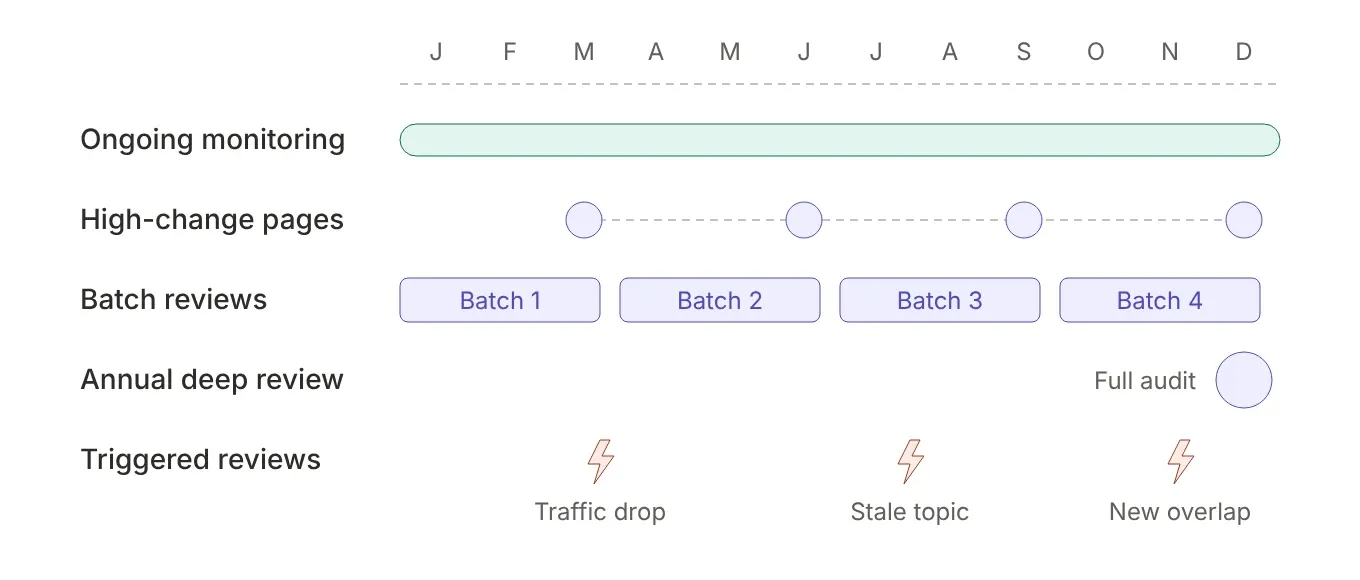
No fixed SEO content pruning schedule works for every website.
The right frequency depends on how much content you publish, how quickly your industry changes, and how often your existing pages become outdated.
For most websites, I recommend treating content pruning as a regular review process rather than a one-time cleanup project.
Review High-Change Content More Often
Some topics become outdated quickly.
SEO recommendations, software features, pricing, statistics, regulations, and technology-related content can change significantly within a year.
These pages deserve more frequent reviews.
If a page depends heavily on information that changes regularly, do not wait several years before checking whether it is still accurate.
Review Large Content Libraries in Batches
If your website has hundreds or thousands of URLs, reviewing every page individually every few months may not be practical.
Instead, work through your content in batches.
Start with pages showing clear signs of declining performance, outdated information, keyword overlap, or limited value.
You can then move through older sections of your content library systematically.
Perform a Deeper Review at Least Once a Year
An annual content review is a useful baseline for many established websites.
During this review, look at traffic trends, rankings, backlinks, conversions, search intent, content accuracy, and overlapping topics.
You do not need to delete pages simply because they are old.
Age is a reason to review a page, not a reason to remove it.
A five-year-old article that continues to provide accurate information and attract relevant visitors may be more valuable than a six-month-old article that receives no meaningful traffic.
Prune When the Data Shows a Problem
You should also review content whenever you notice a significant change.
A previously successful page may experience a sustained decline in organic visibility. Several articles may begin targeting the same search intent. An important topic may become outdated. Your business may also shift focus and leave older content disconnected from your current goals.
These situations can justify a targeted pruning review rather than waiting for your next scheduled audit.
The goal is not to create a rigid calendar where every page gets deleted or rewritten on a specific date.
The goal is to maintain a website where the content continues to serve a clear purpose.
A practical approach is to combine regular monitoring, periodic reviews, and targeted pruning.
Final Thoughts
SEO content pruning is not about deleting as many pages as possible. It is about making better decisions about the content already published on your website.
A low-traffic page is not automatically a bad page. Before removing it, review its rankings, backlinks, conversions, search intent, internal links, and overall usefulness.
In many cases, the better solution is to update the page or combine it with another resource.
The most effective approach is to think in four actions: keep, improve, consolidate, or remove.
Keep pages that continue to provide value. Improve pages with potential that need better content or optimization. Consolidate pages that compete for the same search intent. Remove or redirect pages that no longer serve a useful purpose.
When you treat pruning as an ongoing part of your SEO strategy, your content library becomes easier to manage and easier to align with your business goals.
The strongest content strategy is not necessarily the one with the most URLs. It is the one where every important page has a clear reason to exist.
If you want help evaluating your existing website content and identifying opportunities for improvement, contact me to discuss your SEO strategy and content goals.
Frequently Asked Questions
What is SEO content pruning?
SEO content pruning is the process of reviewing existing website pages and deciding whether to keep, update, consolidate, redirect, or remove them. The goal is to maintain useful, relevant, and purposeful content.
Does deleting old content improve SEO?
Deleting old content does not automatically improve SEO. Before removing a page, evaluate its traffic, rankings, backlinks, conversions, search intent, and relevance. Updating or consolidating the page may be a better option.
Should I delete pages with no organic traffic?
Not necessarily. A page with no current organic traffic may still have valuable backlinks, conversions, internal links, or ranking potential. Review its overall value before deciding whether to remove it.
How do I identify content that needs pruning?
Look for pages with declining traffic, outdated information, weak search visibility, overlapping search intent, poor content quality, or little business value. These signals indicate that a page should be reviewed rather than automatically deleted.
Should I update or delete thin content?
If the topic is still relevant and has potential, updating and expanding the content is usually worth considering. If the page has little value, no meaningful visibility, and no clear purpose, removing or consolidating it may be more appropriate.
When should I redirect an old URL?
Redirect an old URL when its content has been permanently replaced by another relevant page. The destination should closely match the original page's topic or search intent. Avoid redirecting unrelated URLs simply to preserve traffic.
How often should I perform SEO content pruning?
There is no universal schedule. Review content regularly and conduct a deeper audit at least once a year for most established websites. Pages covering fast-changing topics may need more frequent reviews.